CI/CD
Overview
Continuous Integration (CI) and Continuous Deployment (CD) represent a culture — and a set of principles and practices — aimed at delivering code changes more frequently and reliably.
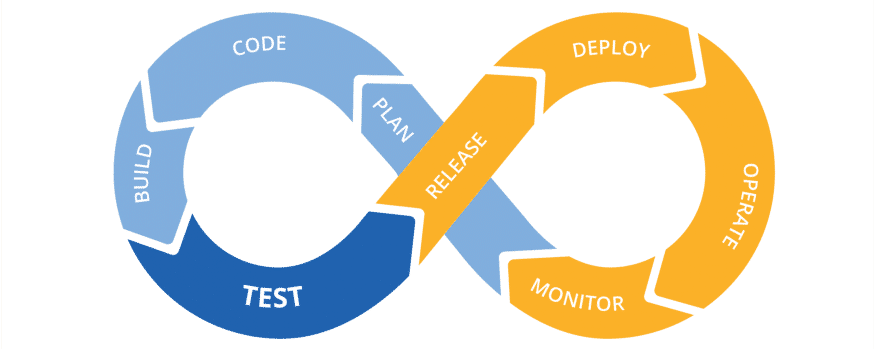
Building an efficient CI/CD pipeline is important for supporting product releases and driving organizational success.
Continuous integration (blue) is a process where code committed to a shared central repository (like Git) is built and tested on every commit, catching issues early. Benefits include early integration and testing, better developer productivity, faster delivery, and faster bug fixing.
Continuous delivery/deployment (yellow) is a process where code changes are continuously and automatically prepared for release to production — providing a deployment-ready artifact after all testing, validation, and verification. Continuous delivery requires a manual approval step to deploy to production; continuous deployment pushes to production automatically.
Understanding CI/CD
CI/CD is a step-by-step approach to continuously and consistently code, build, test, release, and monitor a software product through automation.
Pipelines are predefined jobs that clarify what needs to happen and when. Jobs run in parallel where possible, to speed up delivery. A typical pipeline pushes code to the repository, triggers a build, tests it, and deploys to production — tailored to your needs, pipelines can have multiple stages, jobs, and varying complexity.
Integrating with third-party tools
UiPath offers a command-line interface (CLI) for pre-defined RPA package management and testing tasks — designed to integrate easily with third-party tools like GitLab, Jenkins, and others, without a plugin.
Common use cases:
✅ Packing Studio projects into NuGet packages.
✅ Deploying NuGet packages to Orchestrator.
✅ Running jobs in Orchestrator.
✅ Running test sets in Orchestrator.
Lets you build and deploy UiPath automation processes, and run UiPath automated test cases.
Note
To pack projects created with UiPath Studio 20.10+, use extension version 2.1 or later.
Prerequisites:
✅ .NET 6 installed
✅ Azure DevOps organization and Azure Pipelines account
✅ UiPath Integration for Azure DevOps
✅ A GitHub account for your repository
✅ An Azure pipeline
✅ The right agent type: Azure-Hosted Agent (auto-spawned/disposed per run, public internet access — ensure Orchestrator allows public internet access if building with custom feed dependencies) or Self-Hosted Agent (required if Orchestrator isn't publicly accessible — configure networking accordingly).
Lets you build and deploy UiPath automation processes, and run UiPath automated test cases.
Note
To pack projects created with UiPath Studio 2020.10+, use plugin version 2.1 or later.
Since April 2023 (2023.4), new executions are blocked in classic folders — tasks configured against a classic folder will show a "Folder not found" message and won't run. Learn more about classic folder removal here.
Prerequisites:
✅ Jenkins server on Windows or Linux
✅ At least one Jenkins slave running on Windows (required for step execution)
✅ An Orchestrator instance (basic, federated, or cloud authentication supported)
✅ Orchestrator 2020.4+ for testing features
✅ An imported SSL certificate if using an on-premise Orchestrator under HTTPS
Best practices
✅ Schedule and run automated tests in Dev/Test environments before deployment.
✅ Trigger test execution automatically with DevOps tools like Jenkins, Azure DevOps, or GitHub Actions.
✅ Use parallel execution across multiple robots to reduce test cycle time.
✅ Prefer API-based testing (Integration Service or UiPath.WebAPI activities) over UI-based testing where possible, to reduce UI dependency.
✅ Include tests as part of the CI/CD pipeline.
Further reading
See "Implementing CI/CD pipelines for UiPath test automation" in the UiPath Test Cloud Expert learning plan on UiPath Academy.