Best Practices
General best practices
✅ Maintain test cases and update them after any change request.
✅ Give activities descriptive names, add annotations for non-obvious behaviors, and make activity names reflect the action taken.
✅ Consider using simulate click/type or send Windows messages whenever possible.
✅ Use detailed logging and exception handling to debug the process and avoid false negative results.
✅ Plan for recovery or retry at different stages to avoid failed results.
✅ Use assets for variables that are likely to change and used many times.
✅ Where an application's state must be validated before proceeding, use activities that wait for the desired state rather than hard-coded delays.
✅ Use version control (Git/Automation Ops) to track test script changes and support collaboration.
Optimize test execution performance
✅ Run tests in unattended mode (background execution) for faster results.
✅ Reduce execution time by avoiding unnecessary waits — replace static Delay activities with dynamic wait mechanisms.
✅ Minimize UI interactions by using API and database validations where possible.
Workflow Analyzer
Workflow Analyzer is a static code analyzer that checks your project against quality and reliability standards, without executing it (unlike dynamic analyzers, which run during execution).
It's available in the Design ribbon: Analyze File checks the file currently open in the Designer panel; Analyze Project checks all files in the automation project.
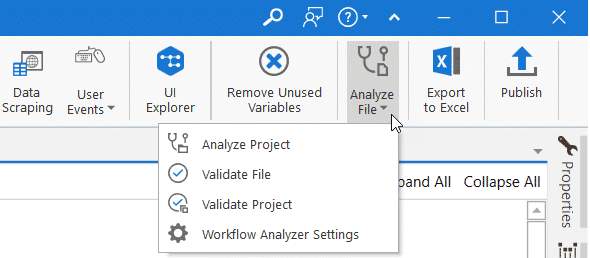
Testing Workflow Analyzer rules
Rules in the Application Testing category carry the TA code prefix and apply to workflows and automation projects — helping maintain stable automation when multiple stakeholders are involved.
| Rule Name | ID | Scope |
|---|---|---|
| Test Case Name Not Unique Within Project | TA-NMG-001 | Workflow |
| Test Case Naming Convention Broken | TA-NMG-002 | Workflow |
| Missing Verifications Within the Test Case | TA-DBP-001 | Workflow |
| Untested Workflows | TA-DBP-002 | Project |
| Test Manager Connected | TA-DBP-003 | Project |
| Unused Mocking | TA-DBP-004 | Project |
| Test Case Without Annotations | TA-DBP-005 | Workflow |
| Test Case/Workflow Too Complex | TA-DBP-006 | Workflow |
| Test Case Includes Too Many Branches | TA-DBP-007 | Workflow |
Next → Generating Synthetic Test Data