Testing Framework
Overview
The Test Automation Framework is a template providing a foundation for testing projects, incorporating essential best practices — capabilities for managing assets, constants, logging, and exception handling. Install it from the Studio template view.
How it works
The template follows three consecutive phases:
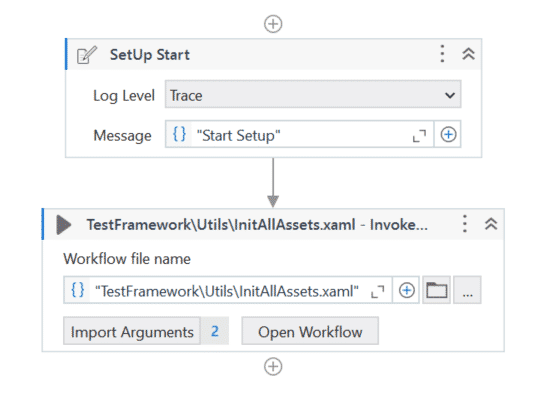
SetUp (SetUp.xaml)
: Prepares the robot environment for testing: initializes all assets, ensures the application under test is started and ready, and starts any logging tools needed to capture results. If initialization succeeds, execution moves to Run Test; if it fails, execution ends, the test case fails, and a screenshot is generated in Orchestrator.
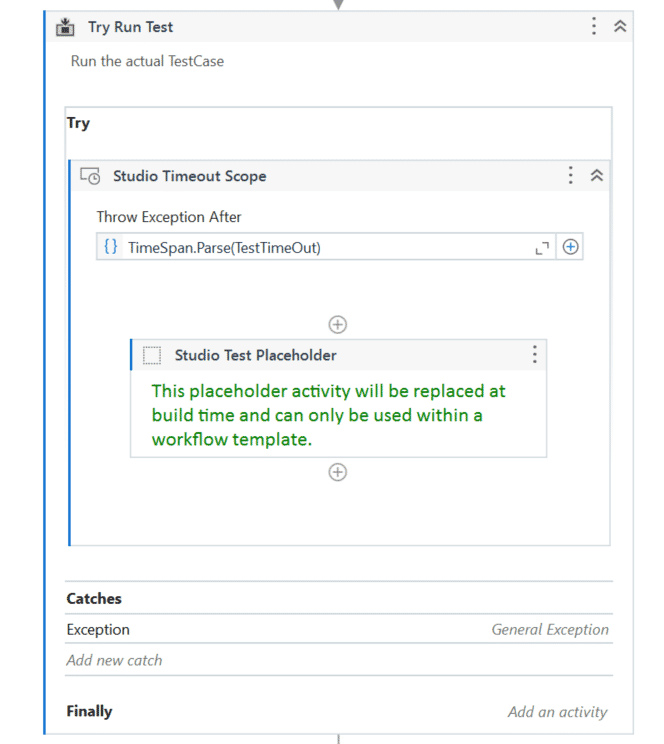
Run Test
: Where the test case executes. The Placeholder activity changes at runtime into an Invoke Workflow File activity, invoking the test case with its execution template attached — creating a temporary workflow file called Generated – TestCaseName. The test case is wrapped in a Timeout Scope with Throw Exception After set to the TestTimeOut constant; if execution exceeds this, it stops (useful if a process ends up in an infinite loop, freeing the robot).
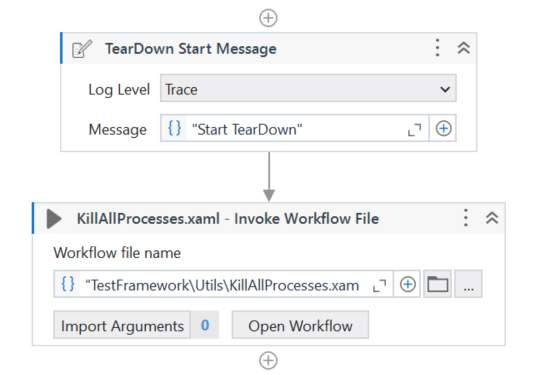
TearDown : Finalizes the test case execution and cleans up the environment for future runs. You can collect logs/debug information, gracefully stop the application under test, and attach files or output using the Attach Document activity.
Customizing the template
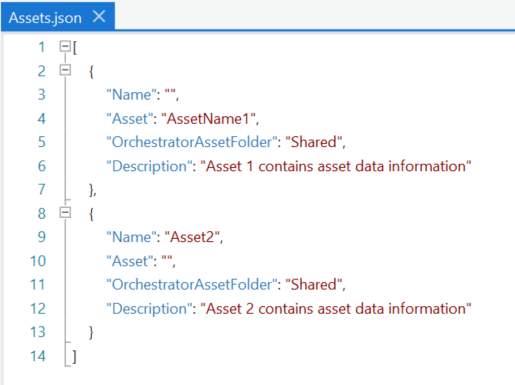
✅ In the Data folder, open Assets.json and add the Orchestrator assets you need.
Note
Use Assets.json for any asset type except credentials — for Orchestrator credential assets, add them as a Constant instead.
✅ In Data Manager, under Constants, add the credential assets you want to use, and access them with a Get Credential activity.
Note
If the credential asset lives in a different Orchestrator folder than the one where the process runs, create another Constant to store the folder name.
✅ Change the TestTimeOut constant to modify the allowed execution time of a test case.
Feel free to add your own custom flows and adapt the framework to your needs.
Exercise
Create a new project based on the test framework and explore its features.
Best practices: building a scalable test automation framework
✅ Object Repository — centralize UI elements for reusability and maintainability.
✅ Workflows (reusable components) — create modular workflows for common actions.
✅ Use Library projects to store reusable components for easy sharing across test cases/projects.
✅ Organize test cases logically into folders by functionality (e.g. Login Tests, API Tests, UI Tests).
✅ Use the Test Automation Framework template for stable, scalable automation projects.
✅ Keep test cases independent — one test case should not depend on another's run.
✅ If the Given part feels cumbersome, the test case may not be atomic enough — consider refactoring.
✅ A test case should have one specific purpose — one logical verification point, though it can include multiple verification activities for that point.
✅ Every feature should have a test; if exceptions are allowed, create a separate test case for each.
✅ Don't delete, move, or rename test cases outside of Studio — perform these actions in Studio only, and use Import Test Cases to reference test cases from another project.