UiPath Test Cloud
What is Test Cloud?
Test Cloud is an enterprise cloud offering designed specifically for application testers. It operates as a dedicated interface of Automation Cloud, specialized for application testing, surfacing UiPath services that help you build a robust test portfolio.
Why Test Cloud?
Test Cloud represents UiPath's strategic initiative to lead the category of agentic testing in the application testing market. Envisioned as a tailored version of Automation Cloud for application testers, Test Cloud creates a welcoming environment specifically for them.
It represents more than just a tool — it embodies UiPath's commitment to prioritizing and enhancing application testing. This commitment is the cornerstone of Test Cloud's identity.
What Happens Today vs. Test Cloud
| What happens today | How Test Cloud improves it |
|---|---|
| Manual effort: A person has to spin up environments, click through UIs, and record results — slow, repetitive, expensive, and error-prone. | Fully automated, cloud-hosted runs: Test Cloud executes pre-built UiPath test cases on demand or on a schedule. No laptops left running overnight, and far fewer “I missed a step” slips. |
| Limited scale: A human (or a small lab) can only run so many scenarios in a day. | Parallel, elastic execution: Dozens or hundreds of tests can fire off simultaneously, so full regression suites finish in minutes instead of hours. |
| Hard to fit into CI/CD: Manual checkpoints slow pipelines and delay feedback to developers. | Native CI/CD hooks: Test Cloud exposes APIs and out-of-the-box connectors for Azure DevOps, GitHub Actions, Jenkins, etc., so every commit can trigger smoke, functional, or UI tests automatically. |
| Quality depends on script discipline, but scripts are hard to share and govern. | Centralized versioning & governance: Test cases, data, and results are stored and managed in one place — making reviews, audit trails, and reuse much simpler. |
Core Benefits
✅ Speed & cost: Machines run scripts far faster and cheaper than people can click, so releases go out quicker and budgets go further.
✅ Reliability: Repeatable, deterministic test runs catch regressions early, reducing production defects.
✅ Scalability: Cloud capacity grows with your pipeline; you're never limited by on-prem hardware.
✅ Balanced approach: Manual exploratory testing still has its place, but Test Cloud handles the repetitive checks, freeing QAs and devs to focus on higher-value exploratory and usability work.
Key Components of Test Cloud
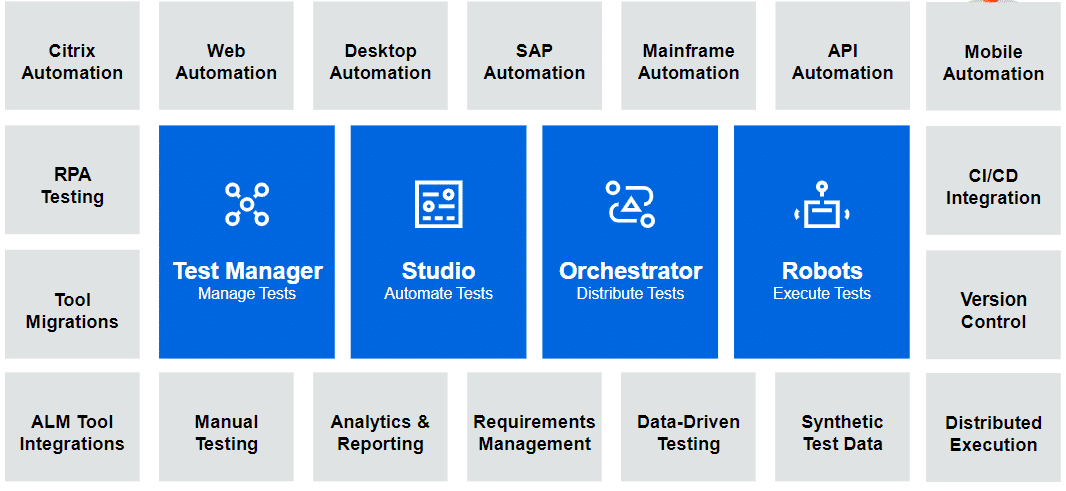
Test Cloud brings together several powerful tools and services:
✅ Test Manager — Plan, run, manage, and analyze application testing
✅ Studio — Build and automate test cases with a visual designer
✅ Orchestrator — Execute and manage test automation at scale
✅ Agentic Testing — Leverage AI agents (Autopilot for Testers, custom agents) to accelerate test design and execution
User & Robot Licenses
Test Cloud uses role-based licensing to match the needs of different team members:
| License Type | Use Case |
|---|---|
| App Tester License | For manual testing, test management tasks, and executing (but not building) automations. Also includes access to Agent Builder. Perfect for QA testers and test managers. |
| App Tester Developer License | For creating automated test cases and process automations for application testing, including agents. Automations are restricted to application testing use cases like test data generation, environment setup, and application monitoring. Ideal for test automation engineers. |
| App Test Robot License | For executing automated application tests, automation tests, and process automations for application testing use cases only. Designed for scaled, unattended test execution. |
Integrations
The main value of Test Cloud relies on synergies between its components, as well as integration with the most popular tools in software development:
Requirements Management
✅ Jira, ServiceNow, Redmine — UiPath Test Manager can pull requirements as test requirements, keeping your testing aligned with project specifications.
Version Control
✅ Git, TFS — UiPath Studio integrates with multiple version control tools for collaborative automation development and change tracking.
CI/CD & Deployment
✅ Jenkins, Azure DevOps — UiPath Test Suite integrates natively for continuous integration and continuous deployment, enabling automated testing at every build.
Application Lifecycle Management
✅ UiPath Test Manager Connect (via Planview® Hub) — Seamless integration with a multitude of ALM tools
-
Synchronize testing artifacts between Test Manager and your desired ALM tool
-
Updates made in Test Manager reflect in the tool you synchronized with
-
Keep traceability of tests and requirements across various systems
Transitioning to Test Cloud
We are transitioning from Test Suite to Test Cloud to clarify our messaging and deliver a dedicated experience for application testers. This new branding reflects UiPath's commitment to making application testing easier, more intuitive, and more integrated with your development workflows.
| Feature | Test Suite | Test Cloud |
|---|---|---|
| Primary Focus | Combined RPA & Application testing | 100% Dedicated to Application Testing |
| Market Identity | Viewed as an add-on automation tool | Positioned as a standalone testing platform |
| Deployment | Multiplatform availability | Cloud and On-Prem |
Features/products not available in Test Cloud
To keep the interface streamlined for core testing tasks, the following features are not included in Test Cloud:
- UiPath Maestro
- Automation Hub
- Process Mining
- Document Understanding
- Communications Mining
RPA Testing vs. Application Testing
Test Cloud is purpose-built for application testing. Understanding the distinction between RPA testing and application testing helps clarify the scope and value of Test Cloud:
| Criterion | RPA Testing | Application Testing |
|---|---|---|
| Primary Focus | Automated workflows | Standalone software applications |
| Core Target | Logins, data entry, and transaction processes in RPA applications | Evaluates the functionality of an application without accessing internal code. Focus on input and expected output based on requirements |
| Testing Approach | Process validation and bot resilience | Black-box testing (inputs vs. outputs) |
| Goal | Ensure bots run correctly despite system changes | Ensure software meets user requirements |
Your Learning Path
Throughout this training, you'll explore each of these components and learn how they work together to create an end-to-end testing solution. We'll start with Test Manager as your command center for planning and managing tests.
Next → Getting Started with Test Manager